Thursday, August 14, 2014

CIA apologizes for spying on Senate committee

 CIA Director John Brennan apologized to the Senate Intelligence Committee on Thursday and admitted the agency spied on computers used by its staffers who prepared an investigation of the controversial post 9/11 CIA interrogation and detention program.

The episode was the subject of an unusual, public dispute between the panel and the spy agency over access to classified information.

The CIA had accused the committee staffers of getting access to internal agency documents and of improperly handling classified material.
Pelosi calls CIA allegations 'appalling'
Senate: CIA evidence suddenly disappeared

The Justice Department looked into it at the request of the CIA and decided there wasn't enough evidence of a crime to warrant further investigation.
"The director is committed to correcting any shortcomings related to this matter" and is commissioning an Accountability Board to be chaired by former Indiana Democratic senator and Intelligence Committee member Evan Bayh, the CIA said.
"This board will review the (inspector general's) report, conduct interviews as needed, and provide the director with recommendations that, depending on its findings, could include potential disciplinary measures and/or steps to address systemic issues." the CIA added.

Wireless HardDrive: Seagate


The shift from PCs and laptops to tablets and smartphones has brought about quite a few shifts in habits and expectations. Different devices have different capabilities and you don't always have the right one with you at the right time.

One of the most frustrating things about using multiple devices is making sure the files you need are available on all of them. Capacities are limited and not always expandable. It also isn't easy to move files from Android to iOS and vice versa. Folks who need to move around a lot usually wind up dependent on some form of online storage which is good enough for text and small files, but impractical for music, video and bulk storage.

Seagate offers a line hard drives that work across all platforms, called Wireless Plus, which can act as hubs for all your digital devices; wired or wireless. It uses Wi-Fi to connect to portable devices and can be accessed by multiple people simultaneously. We had reviewed the 1TB model when it first launched last year, and found it to be a very interesting solution to the problems of storage and inter-accessibility.

Between then and now, Seagate has added support for Amazon's Kindle Fire OS and the Windows 8/RT Modern UI. The companion app for Android and iOS has been totally revamped, and you can now write files to the drive from it. There's also support for integration with Google Drive and Dropbox so you can pull files from these two cloud services as well.
We now have the new 2TB model with us for review. With a high price but equally high capacity, is it just a novelty or a genuinely practical tool?

Look and feel
The Wireless Plus is very thick, chunky and heavy by current standards for portable hard drives. That's mainly because of the hefty battery which is rated for 10 hours of operation. The body is entirely plastic but the top has a brushed metal texture.

There's a Micro-USB 3.0 on the rear like any other hard drive. There's a power button on the left edge and two status LEDs on the front. One LED shows you the device's charge status, while the other lets you know when it's possible to connect via Wi-Fi.

The drive isn't really pocketable and you'll notice its weight in a bag, but that's a fair tradeoff if you want 2TB of data with you at all times and accessible from any device.

You'll find a USB 3.0 cable, charger head, three international plug adapters and a printed guide in the box.


Setup and usage
First of all, you can use the Wireless Plus just like any other portable USB hard drive. Simply plug it in and fire up Windows Explorer or the OSX Finder and browse through its contents. All Wi-Fi functions are disabled when a USB connection is detected, but the battery will charge while it's plugged in.

The drive came preformatted to NTFS and we found that the actual usable capacity was 1.81TB. A driver that enables full OSX read/write access is included on the drive itself, or you can reformat it to HFS+ if you prefer.

To connect via Wi-Fi, all you have to do is press the power button on the side for a few seconds and then wait for the blue Wi-Fi LED to stop flashing. This means it is broadcasting its own signal like your router does. You'll be able to see it in any device's list of available connections, and there's no password or other security by default. Up to eight devices can connect to the Wireless Plus simultaneously but only five can stream media at any time.


Once a connection is established between the Wireless Plus and your device, you can fire up the Seagate Media app (available on Android, Kindle Fire and iOS as well as the Windows 8/RT Modern UI) which will immediately show its contents sorted by media type. Alternatively, you can visit www.seagatewirelessplus.com in any device's browser window, which will give you the same functionality but with a less fluid interface. This is a nice touch, and it means you don't have to go digging around for the drive's IP address. The Web interface is especially handy for other people to access your files without downloading the app first.

The Seagate Media app is required to configure the Wireless Plus. You'll want to set up Wi-Fi security and configure a passthrough so that you can still connect to the Internet - the drive connects to your router and your device connects to the drive. You can also see the drive's battery level, check who is currently connected to it, and set up sharing and synchronisation with Dropbox and Google Drive.

For the most part, the app is not very well designed. It has a lot of functionality but media is not displayed intuitively and there are limited options for sorting and filtering. You can't browse by folder; only by media type. It also doesn't support many video formats. Luckily, this isn't a problem - you can use third-party apps such as VLC Media Player. Just let it scan the local network (which in this case is only the Wireless Plus itself) and you'll be able to access everything. In fact once the initial setup is done, there's really no need to launch the official app at all.


The Wireless Plus is also DLNA compliant, which means devices such as game consoles, smart TVs and digital media players can be used to browse and stream its contents. You'll need to set up the Wi-Fi passthrough so that the Wireless Plus is connected to your home network, after which other connected devices recognise it seamlessly just like any network-attached storage (NAS) or PC would be. Once you've configured the drive's Wi-Fi passthrough settings and it knows how to connect to your home network automatically, you should also be able to just turn it on and use it via your other DLNA products without needing its own app.

Seagate offers remote access features with all its network-attached drives, and the Wireless Plus is no different. In fact, you could leave it plugged in to a wall socket and it would function just like any other NAS on your home network and over the Internet.

All this makes the Wireless Plus an incredibly useful and versatile product.


Performance
We tested the Wireless Plus with an iPhone 5c, a fourth generation iPad, a Windows 8 laptop and a WD Live network media receiver. We had no problem with Wi-Fi stability, although it took up to a minute for the drive to become ready for use each time it was turned on.

Media streaming worked pretty well as long as we were using an app that supported the file formats we wanted to play instead of the official app. Stuttering was extremely rare, but skipping around the timeline while playing video files made the stream drop quite often.

When used as a desktop drive, SiSoft SANDRA gave us scores that were a bit better than those of the Seagate Backup Plus, a vanilla USB 3.0 hard drive. Sequential read and write scores were 118.93MBps and 119.14MBps respectively, while random read and write scores were 55.43MBps and 66.63MBps respectively.

Verdict
There's no denying the fact that it's amazing to be able to have 2TB of data so easily accessible from such a wide variety of devices. The Wireless Plus could completely change the way you work and travel. You'll be able to get a lot of things done with a smartphone or tablet that would have previously required you to carry a laptop around.

However it is bulky, heavy and expensive. It also relies on a traditional spinning hard drive, which is sensitive to jerks, falls, and other forms of physical damage. You will need to look after it just as carefully as you do any other hard drive - and you should never store important data in only one place.

The 2TB model is very expensive, so you could still go with the 1TB model and enjoy the benefits of the new app. If you don't need so much space and versatility, or if portability and cost are very important, the Kingston MobileLite Wireless which uses SD cards and USB flash drives as the storage media is a very compelling alternative.
Price: Rs. 18,500 (2TB)

Pros

    Extraordinarily versatile
    Supports multiple platforms
    Massive capacity
    Impressive performance

Cons

    Expensive
    Bulky and heavy

Ratings (Out of 5)

    Design: 3.5
    Performance: 4
    Value for Money: 3.5
    Overall: 3.5

Floating Bluetooth Speaker

Looking for a Bluetooth speaker that doubles as a party trick? Audio accessory maker OM Audio has just unveiled its OM/ONE speaker, which is essentially a floating orb that can spin as it plays music.

The $179 OM/ONE uses Bluetooth 4.0 to connect to smartphones, tablets and computers. But the project is still raising money on the crowdfunding site Tilt. Non-backers of the project will have to pay $199 when OM/ONE is launched later this year.

The orb also works independently of its base while it's not floating, so you can easily grab it and toss it in your bag without lugging around its stand.

It's unclear how the speaker floats, but we assume the engineers used special magnets.

In addition to streaming music, OM/ONE comes with an in-built microphone for enabling conference calls. The company claims speaker can last for 15 hours on a single charge.

While the speaker's floating capabilities are downright impressive, it's unclear if this actually offers any benefit beyond its cool factor. OM/ONE hasn't specified how this affects the speaker's audio quality if at all.

OM/ONE has also not mentioned the official launch date, but if you order it today, you're guaranteed to receive it by the holiday season.

Tuesday, August 12, 2014

SAMSUNG GEAR SOLO.:Stand-Alone Smartwatch

We think the idea of stand-alone smartwatches is not yet feasible in the present market scenario, but Samsung thinks otherwise. Reports indicate that Samsung is moving ahead with plans for a smartwatch with its own SIM card and hence, doesn’t need a paired phone. It seems likely that we’ll hear about it as soon as next month.
Korean newspaper The Chosun Ilbo reports that Samsung intends to unveil the Gear Solo watch at the big IFA conference in September. As speculated, the Gear Solo will not require a smartphone for communication functionality, and will be able to place calls, send texts and emails, and perform other tasks with its own SIM card, cellular radio, and service plan.
Samsung Gear Neo
Samsung Gear 2 Neo
The inclusion of SIM support in a smartwatch would enable users to make phone calls from the device, but it is yet to be revealed how Samsung has tackled the issue of heavy battery drain. Samsung has launched three Tizen-powered versions of its Gear smartwatch to date, and one Android Wear model in the form of the Galaxy Gear Live.
Samsung released the Gear 2 and Gear 2 Neo at this year’s MWC, less than six months after their predecessor. The logic of releasing a smartwatch alongside a smartphone makes sense, but in this case the Gear Solo won’t depend on tethering itself to any other device, hence will get a different sort of treatment in the market.
However, Samsung used last year’s IFA to launch the original Galaxy Gear, so it seems a good time as any to unleash a new smartwatch frenzy. Timex Group also announced a smartwatch with its own cellular connection, letting it transmit data without needing to be connected to a smartphone. The company calls it the Ironman One GPS+, and while it may have features commonly found in a smartwatch, it is made mostly for athletes like its predecessors.


HOT : New Images of Note 4 screen leaks

A few hours ago we brought you the first photos showing the Samsung Galaxy Note 4, and now we have a couple more shots for you to feast your eyes upon - though this time it's just the front panel of the phablet that is getting pictured.

It seems to have undergone a photo shoot somewhere in the wild, and it shows a design that's extremely similar (though at first sight not 100% identical) to that portrayed by the earlier images.


Samsung Galaxy Note 4 front panel

The cutouts for the front camera, speaker, and Home button are all where you'd expect them to be, and you can see where the capacitive touch buttons will go alongside the Home button too - adhering to Samsung's standards in terms of placement.

The Galaxy Note 4 is going to be unveiled at the company's pre-IFA event on September 3. The new phablet has been rumored to come with a 5.7-inch QHD (2560x1440) touchscreen, and either a Qualcomm Snapdragon 805 chipset or a Samsung Exynos 5433 (depending on market). It may reach stores after September 15.

Samsung: The largest Manufacturer in Indian Market


According to a report revealed last week, Samsung was no longer India’s largest phone maker (smartphones + feature phones) in Q2 2014, being dethroned by local handset manufacturer Micromax. However, it appears that this may not be accurate. Economic Times talked to BD Park, President and CEO of Samsung South West Asia Operations, who dismissed the report, saying that there was “some business motive behind the release of such kind of data.”

BD Park declared that, far from being eclipsed by another company, Samsung was still India’s largest phone vendor in Q2, controlling almost half of the market. The situation is similar when it comes to smartphones alone, with BD Park saying that Samsung’s smartphone market share has doubled over the share held by its closest competitor.

The report from last week, which put Samsung behind Micromax in overall handset shipments, was released by Counterpoint Research, allegedly being based on “thorough channel checks in terms of sales.” While the truth is out there, somewhere, BD Park acknowledged that Samsung’s growth had “slowed down” compared to a few years ago. But that, of course, doesn’t necessarily mean the company lost its leading position.

Samsung Galaxy Note 4 leaks

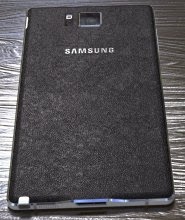
Here's what the Samsung Galaxy Note 4 may look like. While looking very similar to the front of the current Note 3 the back and sides look new.

The phone appears to retain the plastic back with leather-like texture but the sides look similar to the ones on the yet-unannounced Samsung Galaxy Alpha and appear metal.


Samsung Galaxy Note 4

There's a plastic-like inlay in the side-frame that seems to add more water to the frame being metal rumors. The S Pen holster is etched into the side of the phone and there's a microUSB 3.0 port at the bottom along with a speaker grille.

There's what looks like a hear rate monitor alongside the camera lens on the back. The display of the Galaxy Note 4 should be 5.7" once again but with an improved resolution of 2,560 x 1,440 pixels (QHD).

The retail box of the Galaxy Note 4 has also made an appearance. The design on the front looks similar to the one in the images above adding some more credibility to the leak.


Samsung Galaxy Note 4 retail box

The Galaxy Note 4 will be shown (as is customary with Samsung) this coming September 3 on the IFA floor and should make it to the shelves starting September 15.